2,800+
↑ 22% since 2021
UK Licensed Boarding Facilities
Source: CFSG Pet Industry Census 2024 (kennels and boarding combined, estimated)
Multi-night bookings, room assignments, feeding schedules, medication logs, and daily photo updates — all from one system. No more phone calls, paper sheets, or Christmas double-bookings.
No credit card required · Set up in under 15 minutes
Key data on the UK pet boarding sector, digital adoption, and operator benchmarks
Source: CFSG Pet Industry Census 2024 (kennels and boarding combined, estimated)
Surveyed UK boarding facilities; varies by region and room type
Summer school holidays and Christmas/New Year periods (ISPA survey data)
Source: UK Pet Boarding Digital Adoption Survey 2024
Self-reported by operators after switching from paper/spreadsheet systems
When automated reminders and booking deposits are combined
A boarding kennel looks straightforward from the outside: dogs come in, stay for a few nights, go home. In practice, the operational complexity is significant — and it compounds rapidly during school holidays and the Christmas period, precisely when you have the least time to deal with it.
Every dog that stays with you has a profile of specific requirements: which kennel run they're assigned to, what they eat and when, any medication and the exact dosage, vaccination records that need to be current, owner contact details for emergencies, and pickup instructions. Multiply that by 15 or 20 dogs over a seven-night Christmas period and you're managing a substantial amount of information that has direct consequences if it goes wrong.
The problem with paper feeding sheets, reservation diaries, and spreadsheets is that they don't talk to each other. A kennel assistant can't see from the feeding sheet whether the dog in Run 4 is allowed to eat the food another dog's owner brought in. A paper diary can't prevent the receptionist from taking a booking for Run 12 when it's already allocated for those dates. A spreadsheet won't send an owner a photo of their dog at lunchtime so they stop calling to check in.
The Christmas Problem
The period between 22 December and 2 January is the highest-revenue fortnight of the year for most UK boarding kennels — and the highest-risk period for operational errors. Facilities at 95%+ occupancy with skeleton staff are managing the same paper systems under three times the pressure. Double-bookings, missed medications, and overwhelmed phone lines are predictable consequences. Software doesn't get overwhelmed.
There's also the issue of owner anxiety. Pet parents boarding their dog for the first time — or leaving for a two-week holiday — want reassurance. If they can't get you on the phone, they worry. If they do get you, the call takes five minutes you don't have during peak check-in time. A system that sends daily photo updates proactively removes the anxiety before it becomes a phone call.
Before: Paper diary + feeding sheets
Christmas double-bookings, phone lines jammed, medication errors, 4+ hours/day on admin
After: MyPetCare
Zero double-bookings, digital feeding logs, owner updates sent automatically, 1.5 hrs/day on admin
Dog boarding software is a management platform built specifically around the operational reality of overnight pet care — which is fundamentally different from a hotel booking system or a vet appointment scheduler. Boarding involves managing multi-night stays across a fixed number of rooms or kennel runs, tracking detailed care requirements for each dog, keeping owners informed throughout the stay, and ensuring vaccination compliance at every check-in.
A purpose-built system unifies all of this. Owners book and pay online without calling. The system assigns rooms based on the dog's size and your rules. Feeding instructions and medication schedules appear on a staff task list each morning. Photo updates go to owners automatically. Vaccination records are tracked against each pet profile with alerts when certificates are approaching expiry. At the end of a stay, invoicing runs without anyone adding up days and rates on a calculator.
At MyPetCare, the platform covers boarding alongside dog daycare, kennel management, and cattery operations — all from one login. If you offer multiple services, this matters: the same dog can have a daycare history, a boarding reservation, and an upcoming cattery stay, all visible from one profile without re-entering data.
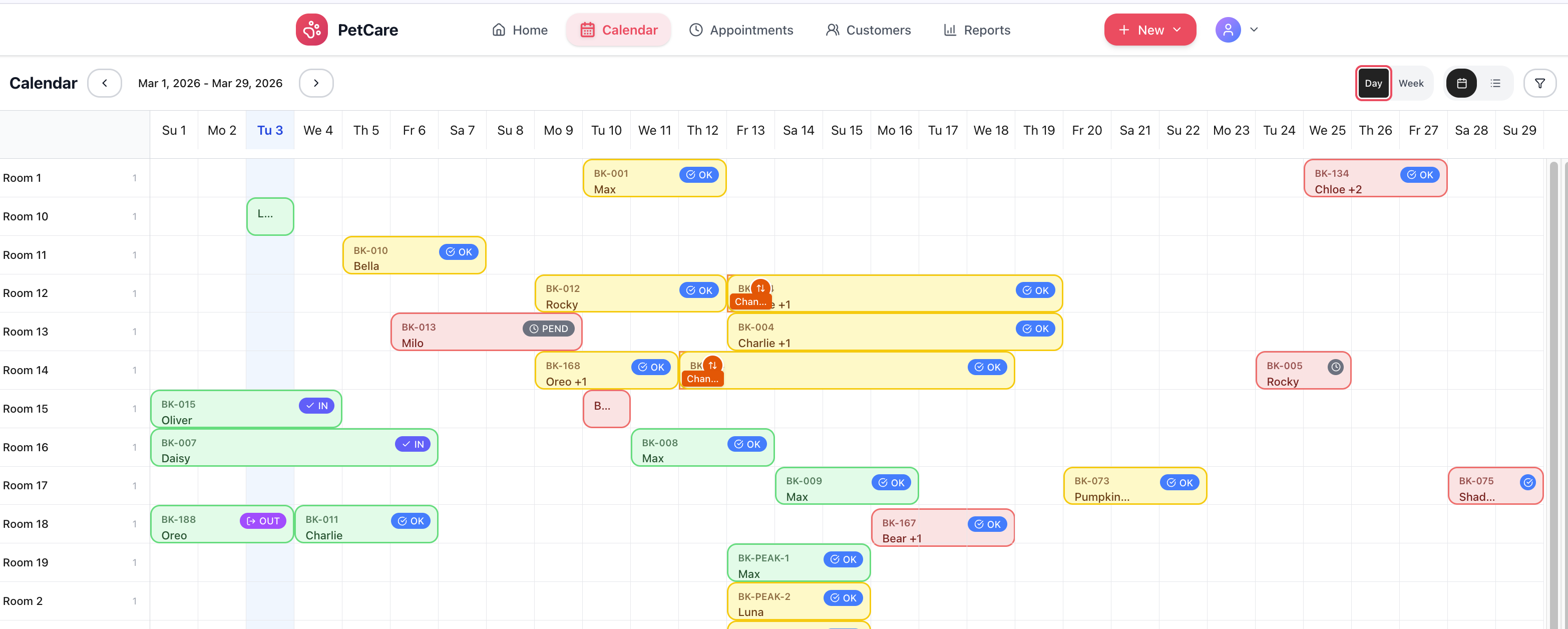
The features that make the biggest operational difference aren't the most exciting to describe — they're the ones that eliminate the problems that happen every week without them.
The booking engine understands overnight stays: owners select arrival and departure dates, and the system calculates the cost based on the number of nights, the room type, and any add-ons selected. Availability is shown in real time — if every standard kennel run is booked for the Christmas week, the standard option disappears from the booking flow without any manual intervention.
For owners booking well in advance — which most do for school holiday and Christmas periods — the system sends a booking confirmation with their dog's allocated room details and check-in instructions. Reminders go out automatically as the stay approaches. When a cancellation comes in, a slot reopens immediately and any waitlisted owners receive an automatic notification.
Facilities can configure minimum and maximum stay lengths, check-in and check-out time windows, and blocks for maintenance or facility preparation days. Read more: Dog Boarding Software: The Complete Guide for UK Kennels.
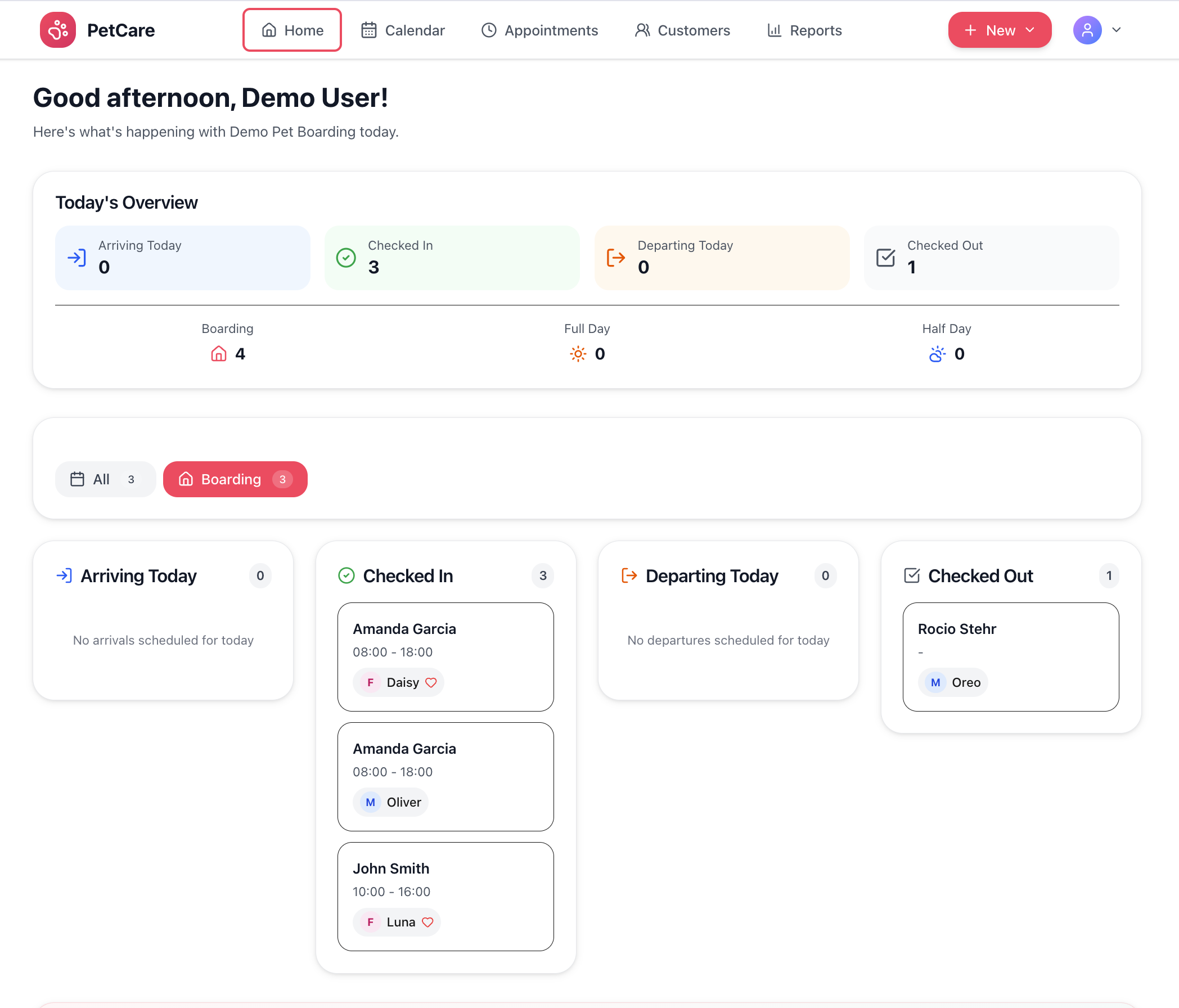
Each room or kennel run in your facility is set up as a named unit in the system with size category, features, and any special designations (quiet area, outdoor run, accessible for mobility-limited dogs). When a booking is confirmed, you assign a specific room either manually or via an auto-assign function that places dogs based on size match and availability.
The kennel view shows every run on a grid with its current status: occupied, check-in today, check-out today, blocked for cleaning, or available. This is the view staff use to plan the morning: they can see at a glance which dogs arrive, which leave, and which runs need preparing. For facilities with multiple dog families, runs can be linked so siblings from the same household are placed adjacent.
Blocking runs for maintenance, inspection preparation, or deep cleaning is a single click. The system prevents new bookings being accepted for that period while the block is in place, and staff see the block reason in the room view.
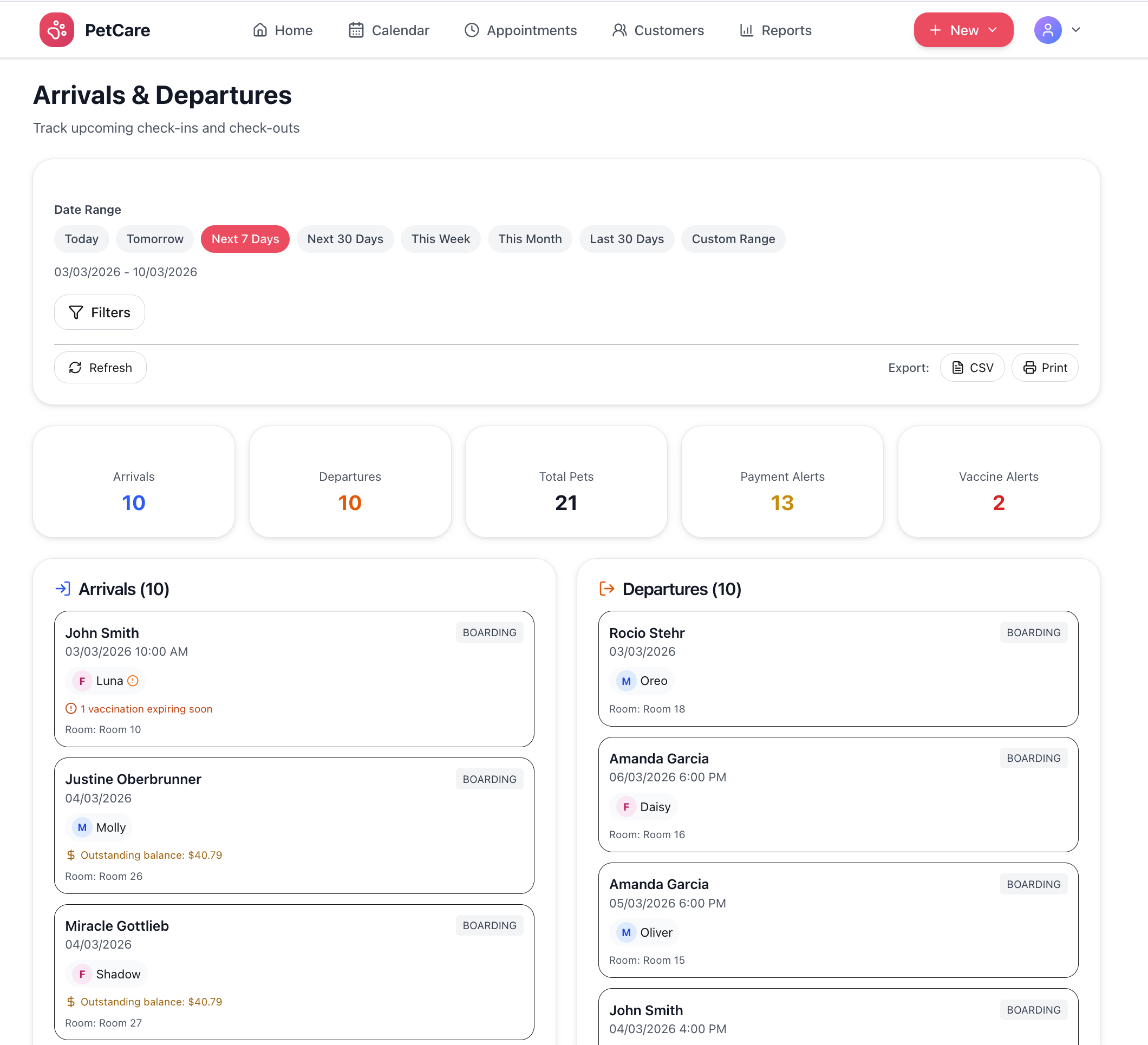
Feeding instructions are stored on each dog's profile: meal times, portion size, food type (owner-supplied or facility food), and any dietary restrictions or allergies. When a boarding stay is active, the system generates a daily feeding schedule for staff showing every dog's meal requirements in time order. Staff mark each feeding as completed from their phone; any skipped meals or noted issues are flagged for supervisor review.
Medication is managed with the same rigour. Each prescription or supplement is entered with dosage, frequency, method of administration, and timing. Staff see medication reminders alongside feeding schedules and sign off each administration. The log is visible to owners in the portal and provides a complete record for veterinary purposes if a health issue arises during the stay.
Owners see feeding and medication logs updated throughout the day, which dramatically reduces anxious "is he eating?" phone calls — particularly during longer stays when dogs sometimes eat less for the first day or two. A logged entry showing morning feeding completed and medication administered is more reassuring than a verbal update over the phone.
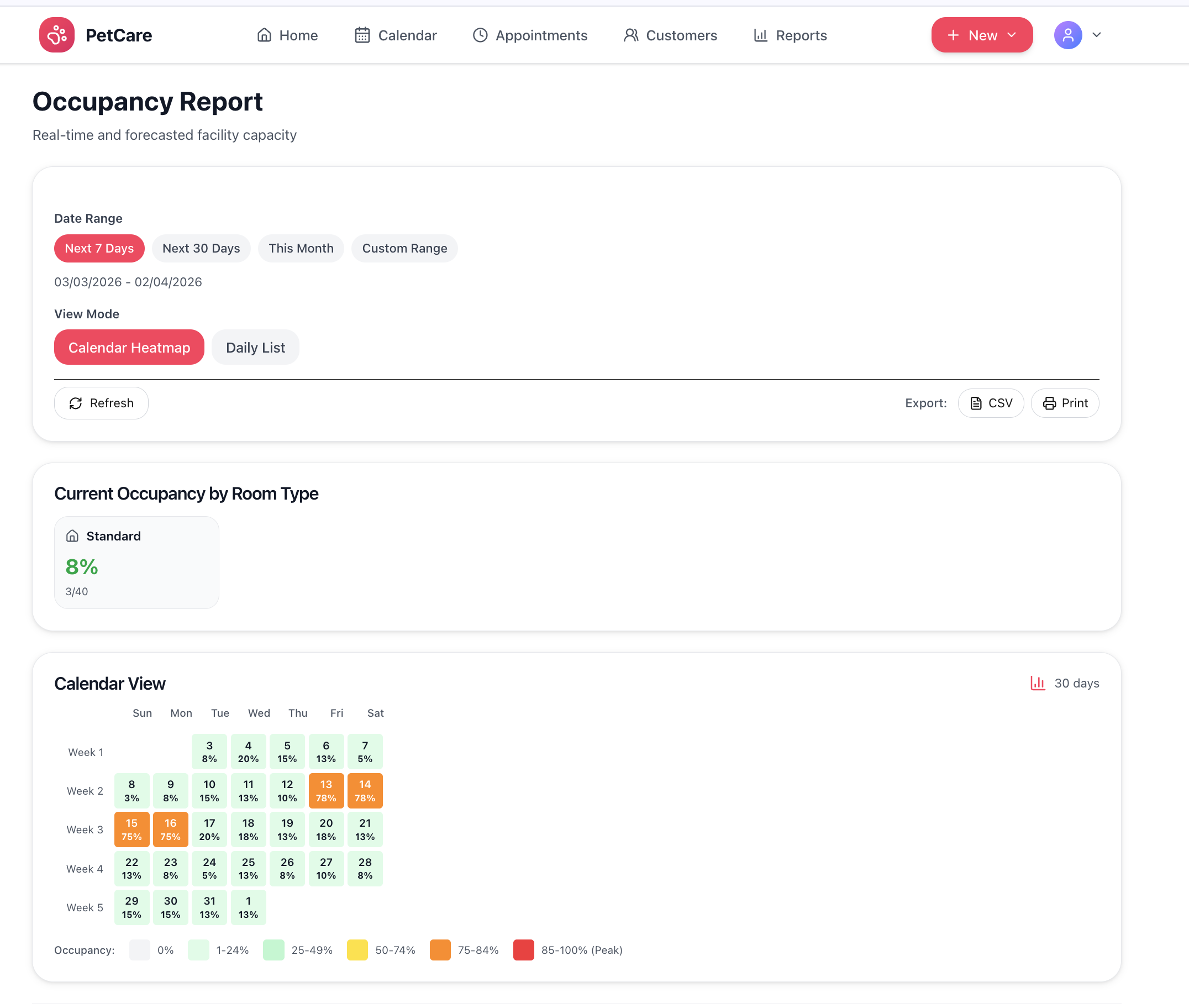
For most pet owners, the hardest part of boarding isn't the preparation — it's the silence after drop-off. Not knowing how their dog is settling in creates anxiety that generates phone calls to your facility at inconvenient times. A proactive daily update with a photo and a short note largely eliminates this, because owners feel informed without needing to ask.
Staff capture photos using their phone and add a brief activity note — "settled in well this morning, went straight to his bed" or "enjoyed a good run in the yard this afternoon" — which sends as a branded update to the owner by email or appears in their owner portal. For stays of a week or more, owners receive updates each day without any increase in staff effort beyond the two minutes it takes to snap a photo and add a note.
The communication log also serves a practical purpose: if an owner later disputes something about their dog's stay, there is a timestamped record of every update sent. Related: Is Dog Boarding Software Worth It? An Honest Assessment.
Deposits are the most effective way to reduce boarding no-shows, particularly for holiday periods when empty kennels cannot be filled at short notice. The system collects a configurable deposit percentage when a booking is confirmed — via Stripe, so payment is secure and immediate. The remaining balance can be collected at check-in, check-out, or on a scheduled date.
Your cancellation and refund policy is configured once and applied consistently to every booking, removing any ambiguity about whether deposits are refundable and under what conditions. This reduces disputes considerably compared to verbal policies communicated by different staff members.
At month end, the system generates revenue reports broken down by room type, service, and time period — useful for understanding which capacity is most profitable and where pricing adjustments might be warranted.
Use our free Revenue Calculator to estimate boarding income by season, model the impact of deposit collection on no-shows, and plan capacity for peak periods.
Try the CalculatorMyPetCare vs generic pet software vs paper and spreadsheet management
| Feature | MyPetCare | Generic Pet Software | Manual/Spreadsheets |
|---|---|---|---|
| Online Booking 24/7 | ✓ | ✓ | ✗ |
| Multi-Night Stay Management | ✓ | ✓ | ✗ |
| Room/Kennel Run Assignments | ✓ | ✗ | ✗ |
| Feeding Schedule Tracking | ✓ | ✗ | ✗ |
| Medication Administration Logs | ✓ | ✗ | ✗ |
| Daily Photo Updates to Owners | ✓ | ✗ | ✗ |
| Automated Deposit Collection | ✓ | ✓ | ✗ |
| Vaccination Tracking | ✓ | ✗ | ✗ |
| Peak Season Pricing | Coming Soon | ✗ | ✗ |
| Monthly Cost | From £40 | From £80 | Manual/Free |
MyPetCare was built by a team with direct experience in pet boarding and daycare operations. The feeding logs, medication records, and room assignment workflows weren't designed by software engineers guessing at the workflow — they were built around what actually happens during a busy kennel handover.
We're currently in early access with a select group of UK boarding and daycare operators. Early access members get full platform access at a founding-member rate, input into the product roadmap, and pricing that never increases as the platform grows.
Founding Member Rate
Lock in early access pricing for the lifetime of your account. Rate never increases as long as you remain a member.
UK Licence-Ready
Digital records designed to support local authority boarding licence inspections. Vaccination tracking, care logs, and emergency contact records all accessible from one report.
GDPR-Compliant Data Handling
Customer data stored and processed in compliance with UK GDPR requirements. Stripe payment processing with full PCI compliance.
The options range from generic appointment scheduling systems that have been stretched to cover pet boarding to systems built from the ground up for overnight animal care. The difference matters operationally. Here's how to evaluate them.
Related guides: Kennel Software · Dog Daycare Software · Cattery Software
petcare.software is trusted by pet businesses across the UK. Start your free trial today and see why operators are making the switch.
Start Free TrialDog boarding software is a specialised management platform for pet boarding facilities and kennels. It handles multi-night stay bookings, room or kennel run assignments, vaccination tracking with automatic expiry alerts, feeding schedules, medication administration logs, automated payment and deposit collection, and owner communication with daily photo updates. Purpose-built systems help boarding facilities save 12–16 hours per week compared to paper and spreadsheet methods.
Dog boarding software typically costs £40–150 per month depending on features, facility capacity, and booking volume. MyPetCare offers flat monthly pricing from £40 with no per-booking transaction fees and all features included. Avoid platforms that charge 3–5% per transaction — at typical boarding volumes, this adds thousands per year in costs that grow as your business grows.
Essential features for boarding: multi-night booking management with automatic pricing, room or kennel run assignment by size and type, vaccination tracking with expiry alerts, feeding schedule management with staff completion logging, medication administration records, photo updates to owners, automated reminders and deposits, and a mobile-friendly interface for staff using phones and tablets. Facilities running boarding alongside daycare benefit most from a unified platform.
Yes. MyPetCare manages boarding, daycare, and cattery services from one platform with shared customer and pet records. You can book the same dog for daycare on weekdays and boarding at weekends without re-entering their details. Staff see the full picture from one login, owners manage everything from one portal, and invoicing runs across all service types without manual reconciliation.
You define each room or kennel run in the system with a name, size category, and any special features (outdoor access, webcam, suite upgrade). When a booking is confirmed, you assign a specific room or the system assigns automatically based on the dog's size and any owner preferences. The calendar shows each room's availability at a glance, blocks rooms for maintenance, and prevents the same room being double-booked. You can also group adjacent runs for families with multiple dogs.
Yes. Staff capture photos and quick notes from their phones, which send as branded daily updates to owners via email or the owner portal. Owners can see feeding logs, medication records, and activity notes throughout the stay without calling. This typically reduces "how is my dog?" calls by 50–60%, which is significant during busy holiday periods when phones would otherwise be ringing constantly.
For holidays and school breaks, the system enforces the same capacity rules as any other period — rooms fill up and go unavailable automatically. Waitlist functionality captures demand when you're fully booked: owners join the list and get automatic notifications when a cancellation opens up. Deposits, collected at booking, make cancellations less common. Peak season pricing (charging more per night during high-demand periods) is in development and available to early access customers.
Each dog's profile holds feeding instructions: meal times, portion sizes, food type, and any dietary restrictions or allergies. Staff see a feeding schedule each morning and mark meals as completed from their phone or tablet. Any issues — a dog refusing food, an upset stomach — are logged as notes that appear in the owner's portal. Medication is tracked the same way, with dosage, timing, and staff sign-off recorded for every administration.
Yes. Deposits are configured as a fixed amount or percentage of the total booking value, collected automatically when the booking is confirmed via Stripe. You set your deposit policy, cancellation terms, and refund rules. Deposits typically reduce boarding no-shows by 45–55%, which matters most over Christmas and summer school holidays when a last-minute cancellation is difficult to fill. The remaining balance is charged at check-in or check-out.
Room assignments, feeding logs, owner updates, and deposits — all handled without phone calls or paper systems.
No credit card required · Cancel any time · Set up in under 15 minutes
Written by the MyPetCare Team
This guide was written by the MyPetCare founding team. Our founders spent years working in and operating dog boarding and daycare facilities in the UK. The operational challenges described here — Christmas double-bookings, paper feeding sheets, anxious owner calls — are things we dealt with directly before building MyPetCare to solve them.
Last updated: March 2026
We use cookies to improve your experience and analyze site traffic. Learn more